
The previous posts in this series were about outcomes: referrals, caregivers, stars, denials and hospice stays. This one is about how the product is built, for the CIO and the data team who would have to run it. The short version: one data model, one definition per metric, an AI layer written back to the lakehouse as tables, and an app that only reads.
Why one model, not five dashboards
A home-care agency's questions cross systems. “Why did we decline this referral?” needs intake data. “Who could have staffed it?” needs the schedule, caregiver availability and HR. “What is it worth?” needs claims and the payer. “How do we compare locally?” needs public CMS data for the county. Five dashboards on five systems give five partial answers with five definitions of a patient.
Home Care 360 puts the nine entities an operator manages on one model, linked by keys, in one schema:
Every entity has a 360 page in the app with the same frame: KPIs, tabs of related records, AI insights, alerts, what changed and recommended actions.
Five layers of tables
The schema follows the medallion pattern most lakehouse teams already use, with table prefixes that say what each layer is for. 61 tables in all.
| Layer | Tables | What they hold |
|---|---|---|
Reference ref_ | 6 | Service lines, disciplines, PDGM groupings, decline and denial reasons, the CMS measure dictionary |
Dimensions dim_ | 8 | Operator, branch, patient, caregiver, referral source, payer, county, competitor |
Facts fact_ | 14 | Referrals, admissions, episodes, visits, claims, authorizations, hospitalizations, surveys, caregiver hours and availability, recruiting, branch quality and P&L, CMS measures |
Aggregates agg_ | 15 | Branch, portfolio, service-line, payer, county, caregiver and patient KPIs, built in the warehouse so every page agrees |
AI layer ai_, seg_, graph_ | 18 | Insights, changes, alerts, recommendations, briefs, ten scoring tables, segments and the entity graph |
One definition per metric
“Referral conversion”, “missed-visit rate”, “continuity”, “LUPA rate”, “live-discharge rate”: each has one written definition, and the aggregate tables compute it once in the warehouse. The executive home, a branch 360, a morning brief and the assistant all read the same row. A validator checks the build: in the current demo build, 334 checks on the generated data and 532 against the warehouse — foreign keys, roll-ups, money that reconciles from visits to claims to the P&L, the arithmetic of every recommendation, the shape of synthetic patient data, and the CMS loads.
The AI layer is tables, not a black box
Every night the AI layer reads the facts and aggregates and writes its results back to the lakehouse. In the demo build that is:
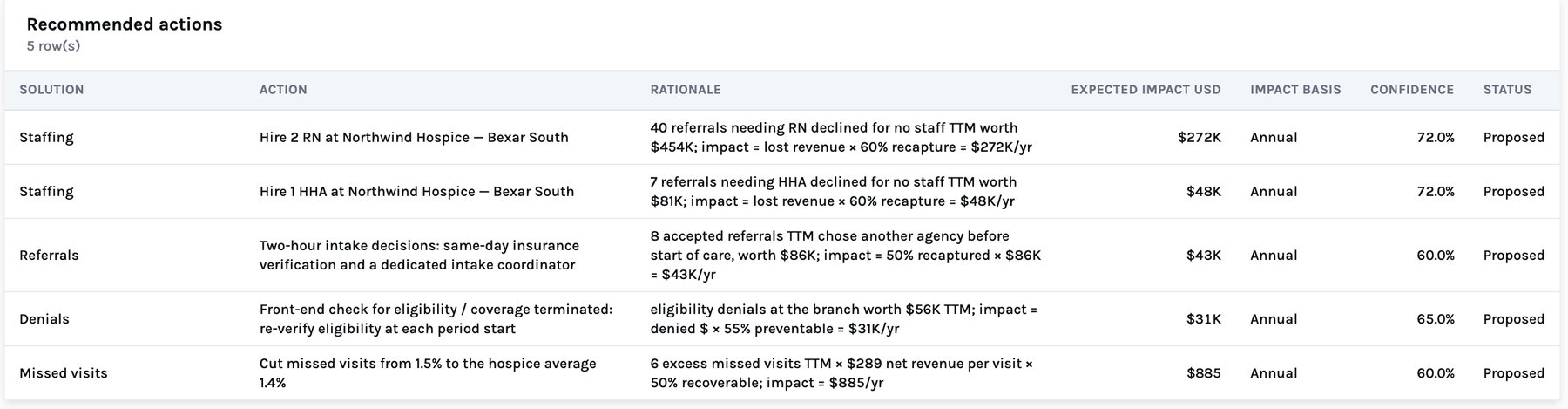
Because the output is rows, it is auditable like any other data. An insight row stores the source table and keys behind its claim. A recommendation row stores its rationale as a formula — “impact = lost revenue × 60% recapture = $272K/yr” — and the validator recomputes every family of them. Nothing is computed on the fly in the browser, and nothing an executive reads differs from what the data team can query.
Generated, scored, live: what is what
- Generated. In the demo, insight text, risk scores, copilot matches, recommendations and briefs are produced by transparent rules and formulas over the synthetic data. They show where trained models and LLM-written insights land; they are not models trained on real outcomes. There is no model registry in the demo.
- Calibrated. Where a score is a probability, it is calibrated so its average matches the rate observed in the data — for example, the share of caregivers who left in the last 90 days.
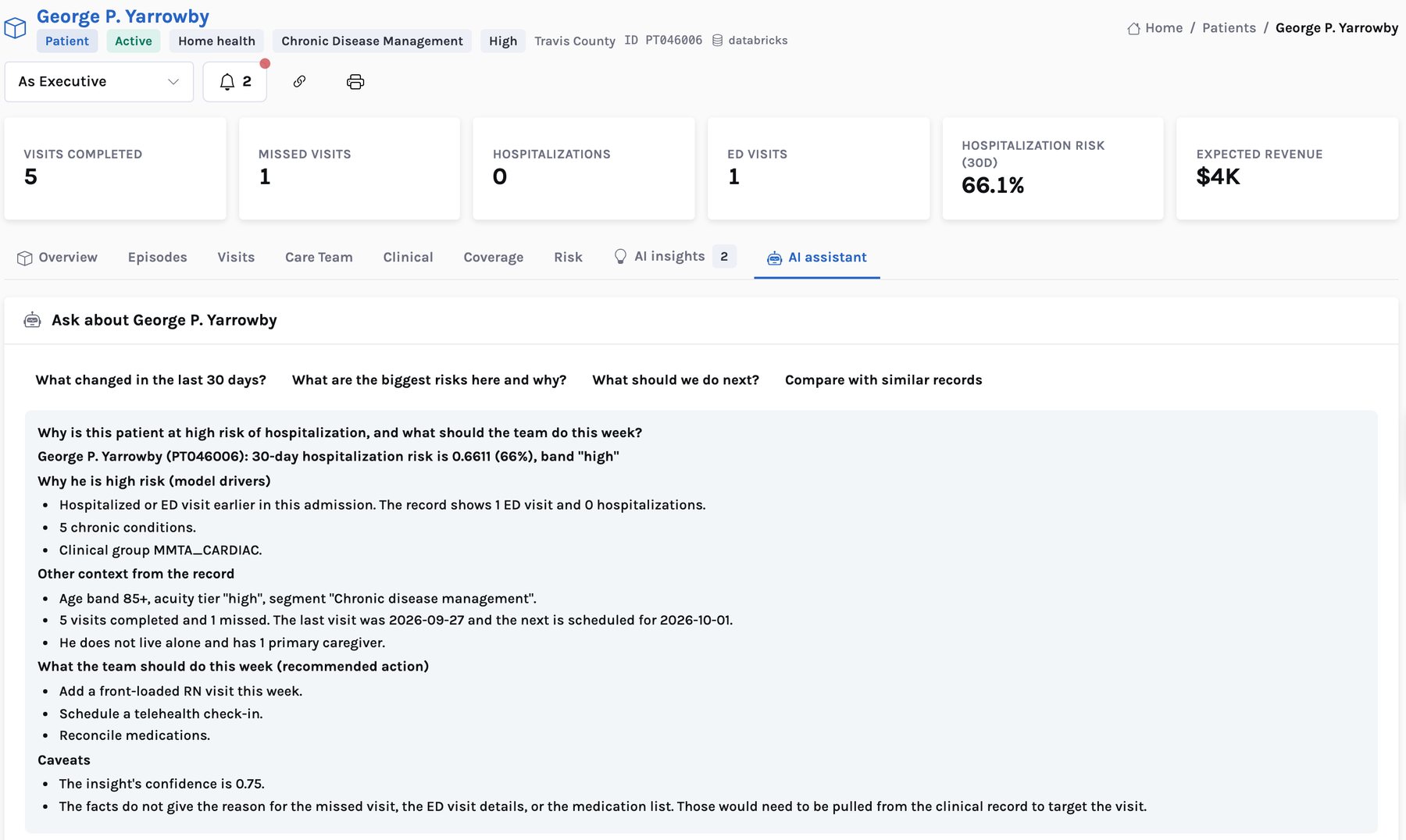
- Live. The assistant’s answers are live LLM output. It reads only the governed data for the entity in view, quotes figures as given, and says what the data does not cover.
- In a pilot. The scores are trained on the operator’s own history, and model versions are recorded with the scores they produce.
Serving: contracts, a cache and an audit log
The app never sends free-form SQL to the warehouse. Every page part — a 360 tab, a workbench panel, a brief section — is a named, reviewed, read-only data contract. There are 217 of them, generated from code. Adding a tab to a 360 means adding a contract, not new application code, and the data team can see exactly which columns each page reads.
In the demo's smoke test, cached lists, 360s and workbenches answered in roughly 0.05–0.4 seconds; the first, uncached request goes to the SQL warehouse.
Heavy work happens once a night in the warehouse; people read cached results. Page speed and compute cost do not grow with the number of users, which matters for a product meant to be opened by every branch director and scheduler every morning.
Synthetic data that looks like PHI, on purpose
To demonstrate a home-care product without real patients, the demo data has to look like the real thing without being it. Every patient, caregiver, referral source, visit, claim and authorization is synthetic and tagged as such. Patients have obviously invented names, a birth year and age band but no date of birth, a county and service zone but no address or ZIP code, and no Social Security, Medicare or Medicaid number. County names and FIPS codes are real public geography. Competitor agencies are real, from public CMS files. The validator checks the synthetic records keep that shape.
The production path, as designed
- PHI stays in your tenancy. The schema is built inside your workspace and queried in place, under your permissions. There is no copy to a vendor warehouse.
- Read-only by construction. Pages, briefs and the assistant only read. Nothing is written to scheduling, EHR, HR or billing systems; people act there.
- Insulated from change. Pages read stable contracts, so a change in a source system touches the mapping into the model, not the app.
- No certification claimed. We do not claim HIPAA or any other certification for the demo. Production runs under your business associate agreement and your security review.
What the pilot needs from you
A pilot region and a matched control region; read access to source extracts in your lakehouse (or a pilot schema); an identity provider to connect; and an operations lead for an hour a week. Days 1–30 build the layer for one region and load CMS data for your counties; days 31–60 calibrate thresholds and train the scores on your history; days 61–90 run live against the control region and read out the agreed measures.
Start from the beginning of the series with the referral you could not staff, or see the Home Care 360 product page.
Home Care 360: grow admissions, fill every visit and keep your caregivers
Where the value is, the AI layer, the CMS benchmark, the lakehouse architecture and the 90-day pilot, for CIO, COO and CFO leadership.